MCP(Model Context Protocol)
A protocol for seamless integration between LLM applications and external data sources 一种用于 LLM 应用与外部数据源无缝集成的协议
The Model Context Protocol (MCP) is an open protocol that enables seamless integration between LLM applications and external data sources and tools. Whether you're building an AI-powered IDE, enhancing a chat interface, or creating custom AI workflows, MCP provides a standardized way to connect LLMs with the context they need.
模型上下文协议(MCP)是一种开放协议,能够实现 LLM 应用与外部数据源和工具之间的无缝集成。无论你是在构建一个 AI 驱动的 IDE、优化聊天界面,还是创建自定义 AI 工作流程,MCP 都为 LLM 提供了一种标准化的方式,将 LLM 与所需的上下文连接起来。
编写 Python MCP server
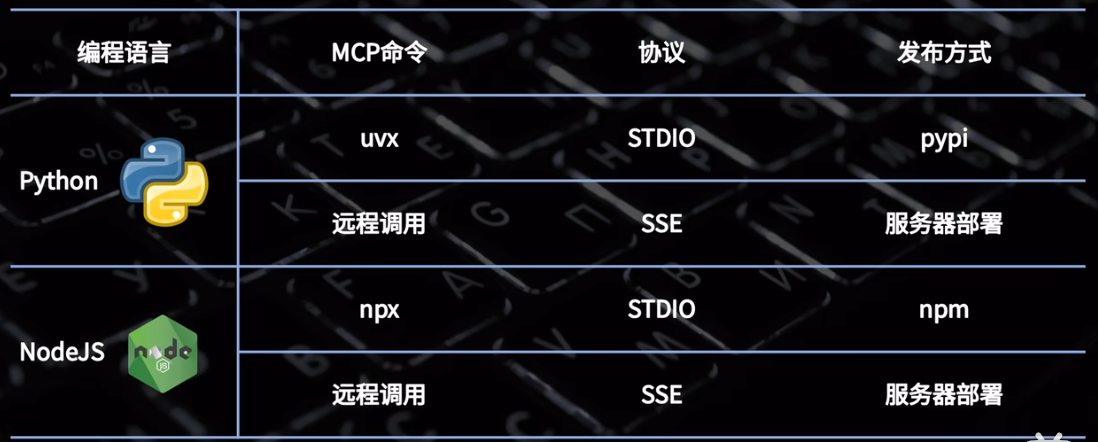
- https://github.com/modelcontextprotocol/python-sdk
- https://github.com/modelcontextprotocol/typescript-sdk
- 使用 uv 管理 Python 环境
shell
# 安装uv
winget install --id=astral-sh.uv  -e

# 初始化python项目
uv init mcp_server2

mcp_server2
  ├─.python-version
  ├─main.py
  ├─pyproject.toml
  ├─README.md
└─uv.lock- 安装 mcp 库
shell
uv add "mcp[cli]"

mcp_server2
  ├─.python-version
  ├─.venv
  │    ├─.lock
  │    ├─CACHEDIR.TAG
  │    ├─Lib
  │    ├─pyvenv.cfg
  │    └─Scripts
  ├─main.py
  ├─pyproject.toml
  ├─README.md
└─uv.lock- 示例代码
python
# 代码来源:https://github.com/modelcontextprotocol/python-sdk
# main.py

from mcp.server.fastmcp import FastMCP

# Create an MCP server
mcp = FastMCP("Demo")

# Add an addition tool
@mcp.tool()
def add(a: int, b: int) -> int:
    """Add two numbers"""
    return a + b

# Run with streamable HTTP transport
if __name__ == "__main__":
mcp.run(transport="stdio")- AI 客户端测试
json
{
  "mcpServers": {
    "p8r6EPFup_MNXHz1c2xYx": {
      "name": "mcp_server2",
      "description": "",
      "baseUrl": "",
      "command": "uv",
      "args": [
        "--directory",
        "E:\\repos\\171h\\mcp_server2",
        "run",
        "main.py"
      ],
      "env": {},
      "isActive": true,
      "type": "stdio",
      "registryUrl": ""
    }
}