SVG (sacalable vector grahpics)
概述
SVG 是一种基于XML语法的图像格式,全称是可缩放矢量图(Scalable Vector Graphics)。其他图像格式都是基于像素处理的,SVG则是属于对图像的形状描述,所以它本质上是文本文件,体积较小,且不管放大多少倍都不会失真。
SVG文件可以直接插入网页,成为DOM的一部分,然后用 JavaScript 和 CSS 进行操作。
SVG代码也可以写在一个独立文件中,然后用 img/object/iframe/embed 等标签引用插入网页中。
SVG文件也可以作为CSS的背景等属性值使用。
SVG文件还可以转为BASE64编码,然后作为 Data URL 写入网页中。
<!DOCTYPE html>
<html lang="en">

<head>
  <meta charset="UTF-8">
  <meta name="viewport" content="width=device-width, initial-scale=1.0">
  <title>Document</title>
  <style>
    .circle {
      background: url(circle.svg);
    }
  </style>
</head>

<body>
  <svg title="svg element" id="mysvg" xmlns="http://www.w3.org/2000/svg" viewBox="0 0 400 200" preserveAspectRatio="xMidyMid meet">
    <circle id="mycircle" cx="100" cy="100" r="50"></circle>
  </svg>
  <img title="img element" style="display: block; border: 1px solid #ccc;" src="circle.svg" alt="">
  <object title="object element" style="display: block; border: 1px solid #ccc;" id="object" data="circle.svg" type="image/svg+xml"></object>
  <embed title="embed element" style="display: block; border: 1px solid #ccc;" id="embed" src="circle.svg" type="image/svg+xml"></embed>
  <iframe title="iframe element" id="iframe" src="circle.svg"></iframe>
  <div title="div element with css" style="height: 150px; border: 1px solid #ccc;" class="circle"></div>
  <img title="img element with base64" style="display: block; border: 1px solid #ccc;" src="data:image/svg+xml;base64,PHN2ZyBpZD0ibXlzdmciIHhtbG5zPSJodHRwOi8vd3d3LnczLm9yZy8yMDAwL3N2ZyI+DQogIDxjaXJjbGUgaWQ9Im15Y2lyY2xlIiBmaWxsPSJyZWQiIGN4PSI1MCIgY3k9IjUwIiByPSI1MCI+PC9jaXJjbGU+DQo8L3N2Zz4=">
</body>

</html>语法
<svg> 标签
SVG 代码都放在顶层标签 <svg> 中。
<svg width="100" height="100" viewBox="50 50 50 50">
    <circle cx="50" cy="50" r="50" />
</svg>width 和 height 属性可以设置 SVG 图像在 html 元素中所占据的宽度和高度。除了相对单位,页可以采用绝对单位(像素px)。如果不指定这两个属性, SVG 图像默认大小是 300px * 150px (宽x高)。
如果只想展示 SVG 图像的一部分,可以使用 viewBox 属性。
viewBox 属性指定了 SVG 绘制的区域, viewBox 属性值是四个数字,分别表示绘图的左上角的横坐标和纵坐标、视口的高度和宽度。上面的例子中,SVG图像是100px * 100px,viewBox属性值是50 50 50 50,表示绘图的区域是50px * 50px,左上角坐标是50px,50px。 注意:视口必须适配所在的空间,上面代码中,视口的大小时 50px * 50px,由于 SVG 图像的大小是 100px * 100px,所以视口会放大去适配 SVG 图像的大小。 如果不指定 width 和 height 属性,只指定 viewBox 属性,则相当于只给到 SVG 图像的长宽比,这时SVG图像的默认大小将等于所在HTML元素的大小。
<circle> 标签
<circle> 标签用于创建圆形。
.red {
  fill: red;
}
.fancy {
  fill: none;
  stroke: black;
  stroke-width: 3px;
}<svg width="300" height="180">
<circle cx="30" cy="30" r="25" />
<circle cx="30" cy="90" r="25" class="red" />
<circle cx="30" cy="150" r="25" class="fancy"/>
</svg>cx cy r 属性分别表示圆的圆心坐标和半径。
class 属性可以给元素添加样式,同 css 中的 class 属性一样。
SVG 的 CSS 属性与HTML中的 CSS 属性有所不同。
- fill 属性:填充颜色。
- stroke 颜色:描边颜色。
- stroke-width:描边宽度。
line 标签
line 标签用于创建一条直线。
<svg width="300" height="180">
  <line x1="0" y1="50" x2="200" y2="50" style="stroke: red; stroke-width: 5; stroke-linecap: round; stroke-dasharray: 5px,15px;" />
</svg>上面的例子中,x1 y1 表示直线的起的坐标,x2 y2 表示直线的终点坐标。
polyline 标签
polyline 标签用于创建一个折线。
<svg width="300" height="180" style="border: 1px solid #ccc;">
  <style>
    .polyline {
      stroke: red;
      stroke-width: 5;
      fill: yellow;
      transition: all 2s ease;
      transform: rotate(10deg);
      transform-origin: center;
      animation: xuanzhuan 2s linear infinite;
    }
    @keyframes xuanzhuan {
      from {
        transform: rotate(0deg);
      }
      to {
        transform: rotate(360deg);
      }
    }
    .polyline:hover {
      stroke: blue;
      fill: purple;
    }
  </style>
  <polyline points="53,53 60,60 60,110 90,110" class="polyline"/>
</svg>points 属性指定折线的各个点, 格式为 x1,y1 x2,y2 ...,横坐标与纵坐标之间用逗号 , 分隔,点与点之间用空格 分隔。
<polygon> 标签
<polygon> 标签用于创建一个多边形。
<svg width="300" height="180" style="border: 1px solid #ccc;">
  <style>
    .polygon {
      stroke: red;
      stroke-width: 5;
      fill: yellow;
      transition: all 2s ease;
      transform: rotate(10deg);
      transform-origin: center;
      animation: xuanzhuan 2s linear infinite;
    }

    @keyframes xuanzhuan {
      from {
        transform: rotate(0deg);
      }

      to {
        transform: rotate(360deg);
      }
    }

    .polygon:hover {
      stroke: blue;
      fill: purple;
    }
  </style>
  <polygon points="53,53 60,60 60,110 90,110" class="polyline" />
</svg>points 属性指定折线的各个点, 格式为 x1,y1 x2,y2 ...,横坐标与纵坐标之间用逗号 , 分隔,点与点之间用空格 分隔,与<polyline> 标签的区别是:<polygon> 自动将首尾两个点连线闭合,<polyline> 不闭合。
rect 标签
rect 标签用于创建一个矩形。
<svg width="300" height="180">
  <rect x="50" y="50" width="100" height="100" fill="blue" />
</svg>x y 属性分别表示矩形的左上角坐标, width height 属性分别表示矩形的宽高。
<ellipse> 标签
<ellipse> 标签用于创建一个椭圆。
<svg width="300" height="180">
  <ellipse cx="60" cy="60" rx="50" ry="25" fill="blue" stroke="red" stroke-width="5" />
</svg>cx cy 属性分别表示椭圆的圆心坐标, rx ry 属性分别表示椭圆的两个半轴的长度。
<path> 标签
<path> 标签用于创建一个路径。
<svg width="300" height="250" style="border: 1px solid #ccc;">
  <path d="
    M 50,50
    L 100,50
    C 100,100 150,100 150,150
    S 100,100 50,150
    A 50,50 0 0,1 50,150
    Q 50,100 50,50
    Z
  "
  fill="none" stroke="red" stroke-width="5"
  />
</svg>d 属性指定路径的路径数据,它的值是一个字符串,字符串中的每个字符表示一个路径命令。
M x y 命令表示移动到指定位置。 L x y 命令表示绘制直线。 H x 命令表示绘制水平线。 V y 命令表示绘制垂直线。 A rx ry x-axis-rotation large-arc-flag sweep-flag x y 命令表示绘制椭圆弧线。 C cx1 cy1 cx2 cy2 x y 命令表示绘制三次贝塞尔曲线。 从当前点画一条到 (x,y) 的三次贝塞尔曲线,曲线的开始控制点和终点控制点分别为 (cx1,cy1) 和 (cx2,cy2)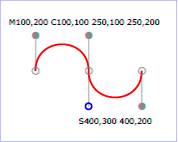
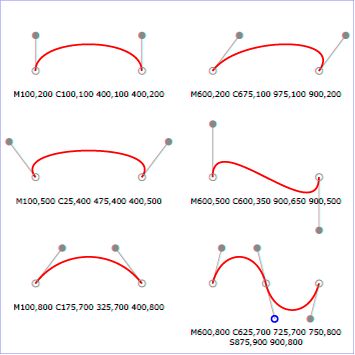
S cx2 cy2 x y 命令表示绘制简写/平滑贝塞尔曲线。 此命令只能跟在,假设 C 命令生成曲线 s ,S命令的作用就是再画一条到 (x,y) 的曲线,曲线的结束控制点为 (cx2,cy2),曲线的开始控制点是 s 的终点控制点关于曲线 s 的对称点。 Q cx cy x y 命令表示绘制二次贝塞尔曲线。 从当前点画一条到 (x,y) 的二次贝塞尔曲线,曲线的控制点为 (cx,cy)。 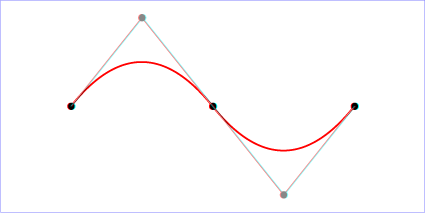
T 命令表示绘制简写/平滑二次贝塞尔曲线。 此命令只能跟在一个 Q 命令使用,假设 Q 命令生成曲线 s ,T 命令的作用就是再画一条到 (x,y) 的二次贝塞尔曲线,,曲线的控制点为 s 控制关于 s 终点的对称点。 T 命令生成的曲线会非常平滑。 Z 命令表示绘制一条从当前位置到起始位置的直线,并关闭路径。
reference: PathElement
<text> 标签
<text> 标签用于创建一个文本。
<svg width="300" height="250" style="border: 1px solid #ccc;">
  <text x="50" y="50" style="fill: blue; font-size: 50px; font-weight: bold; stroke: red; stroke-width: 3;">Hello SVG</text>
</svg>x y 属性分别表示文本区块基线(baseline)的横纵坐标,文本的样式可以用 CSS 样式来设置。
use 标签
<use> 标签用于复制一个元素。
<svg width="300" height="250" style="border: 1px solid #ccc;" >
  <circle id="myCircle" cx="5" cy="5" r="4" />
  <use xlink:href="#myCircle" x="20" y="20" />
  <use xlink:href="#myCircle" x="40" y="40" fill="white" stroke="blue" />
</svg>href 属性指定要复制的元素, x 和 y 属性分别表示要复制的元素在画布中的位置。
<g> 标签
<g> 标签用于创建一个组,可以将多个形状组成一个组(group),方便复用。
<svg width="300" height="250" style="border: 1px solid #ccc;">
  <g id="myGroup">
    <text x="35" y="20">圆形</text>
    <circle cx="50" cy="80" r="50" />
  </g>
  <use xlink:href="#myGroup" x="100" y="0" />
  <use xlink:href="#myGroup" x="200" y="0" fill="white" stroke="blue" />
</svg><defs> 标签
<defs> 标签用于自定义形状,它内部的代码不会显示,仅供引用
<svg width="300" height="250" style="border: 1px solid #ccc;">
  <defs>
    <g id="myGroup">
      <text x="35" y="20">圆形</text>
      <circle cx="50" cy="80" r="50" />
    </g>
  </defs>
  <use xlink:href="#myGroup" x="100" y="0" />
  <use xlink:href="#myGroup" x="200" y="0" fill="white" stroke="blue" />
</svg><pattern> 标签
<pattern> 标签用于自定义一个形状,该形状可以被引用来平铺一个区域。
<svg width="450" height="500" style="border: 1px solid #ccc;">
  <defs>
    <pattern id="dots" x="0" y="0" width="100" height="100" patternUnits="userSpaceOnUse">
      <circle cx="50" cy="50" r="35" fill="blue" stroke="2" />
    </pattern>
  </defs>
  <rect x="0" y="0" width="100%" height="100%" fill="url(#dots)" />
</svg>image 标签
image 标签用于插入图片文件。
<svg width="450" height="100" style="border: 1px solid #ccc;">
  <image x="0" y="0" width="50" height="50" xlink:href="cat.jpg" />
</svg>xlink:href 属性指定图片文件的路径。
animate 标签
<animate> 标签用于创建动画。
<svg width="500" height="150" style="border: 1px solid #ccc;">
  <rect x="0" y="0" width="100" height="100" fill="red">
    <animate attributeName="fill" from="red" to="blue" dur="2s" repeatCount="indefinite" />
    <animate attributeName="x" from="0" to="100" dur="2s" repeatCount="2" />
  </rect>
</svg>attributeName 属性指定要改变的属性名称。 from to 属性分别指定属性的起始值和结束值。 dur 属性指定动画的持续时间。 repeatCount 属性指定动画的循环次数。
<animateTransform> 标签
<animate> 标签对 CSS 的 transform 属性不起作用,如果需要变形,就要使用 <animateTransform> 标签。
<svg width="500" height="150" style="border: 1px solid #ccc;">
  <rect x="0" y="0" width="100" height="100" fill="red">
    <animate attributeName="fill" from="red" to="blue" dur="2s" repeatCount="indefinite" />
    <animate attributeName="x" from="0" to="100" dur="2s" repeatCount="2" />
    <animateTransform attributeName="transform" type="rotate" from="0 50 50" to="360 50 50" dur="2s" repeatCount="indefinite" />
  </rect>
</svg>type 属性指定变形的类型,有 translate scale rotate skewX skewYfrom to 属性分别指定变形的起始值和结束值。 rotate 变形时,from to 值分别表示旋转的起始角度和结束角度 + 旋转的轴点坐标。 dur 属性指定动画的持续时间。 repeatCount 属性指定动画的循环次数。
JavaScript 操作
DOM 操作
如果 SVG 代码直接写在 HTML 网页中,它就成为网页 DOM 的一部分,可以直接用 DOM 操作。
<svg width="400" height="400" style="border: 1px solid #ccc;">
  <rect id="rectJS" x="0" y="0" width="100" height="100" fill="pink" />
  <script>
    var rect = document.querySelector('#rectJS');
    rect.addEventListener('click', function () {
      rect.setAttribute('width', Math.max(Math.random() * 500, 150))
      rect.setAttribute('fill', 'rgb(' + Math.random() * 255 + ',' + Math.random() * 255 + ',' + Math.random() * 255 + ')')
    });
  </script>
</svg>获取 SVG DOM
使用 <object> <embed> 标签插入 SVG 文件,可以获取 SVG DOM。
注意:如果使用 img 标签插入 SVG 文件,则无法获取 SVG DOM。
<script>
  var svgObject1 = document.getElementById('object1');
  var svgObject2 = document.querySelector('#object');
  var svgIframe = document.getElementById('iframe');
  var svgEmbed = document.getElementById('embed');
  console.log('svgObject1', svgObject1);  // <object></object>
  console.log('svgObject2', svgObject2);  // null
  console.log('svgIframe', svgIframe);
  console.log('svgEmbed', svgEmbed);
</script>